

The Case for Better E Ink Optimisation in Dedicated Word Processing Devices
How purpose-built optimisation can unlock E Ink’s true potential for writers.

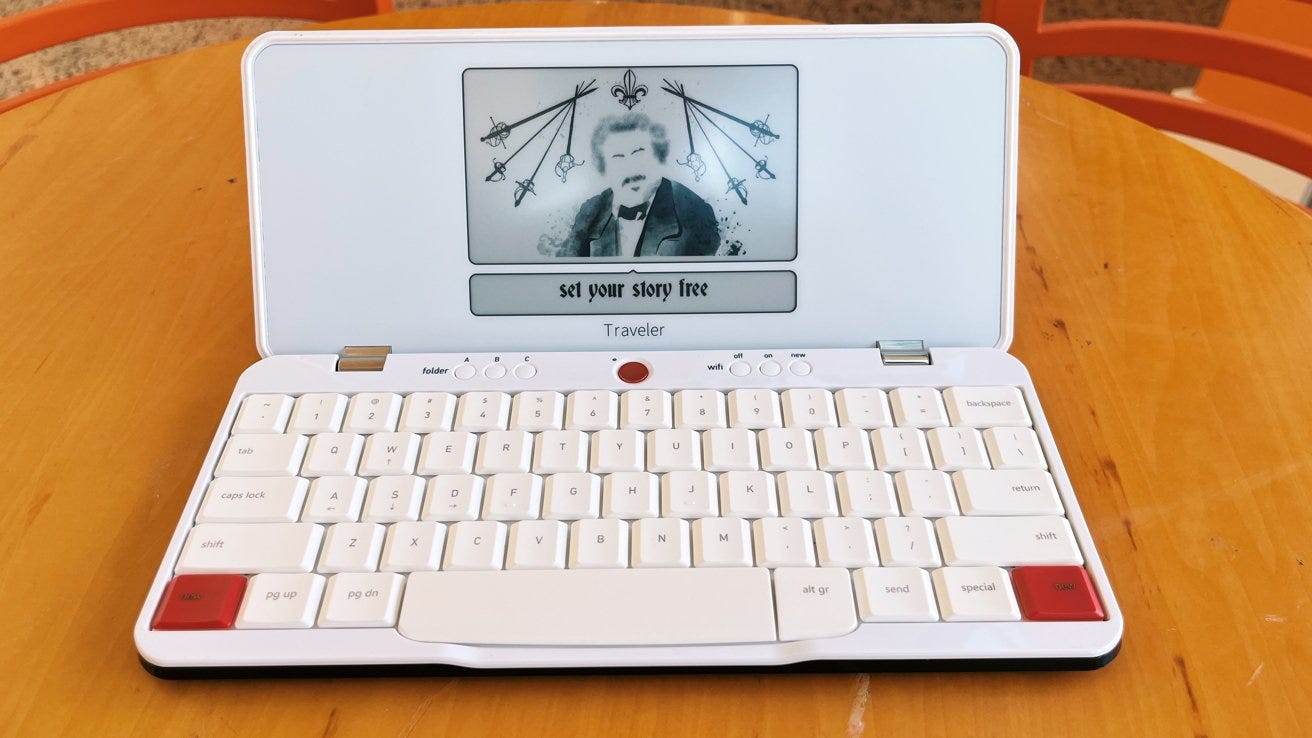
Astrohaus (the small company behind Freewrite, dedicated to E Ink writing devices) announced a major firmware update for Sailfish OS (its purpose-built word processing operating system). The firmware is a top-to-bottom rethinking that promises improvements to writing lag and battery life. According to Astrohaus, the software revamp resulted in a 40 to 100 per cent improvement in the time between text input and its appearance on the display. There is also a claimed 30 to 50 per cent decrease in power consumption to improve battery life.
What Astrohaus has shown is that E Ink can be optimised for word processing, reducing latency and adequately addressing ghosting.
Manufacturers need to do more to optimise E Ink for fast word processing
These software developments underscore the importance of task-specific optimisations for E Ink technology. E Ink’s initial focus was more straightforward, as it consisted mainly of page turns when reading e-books.
Pen input appeared later and gradually improved. In the case of pen input and note-taking, manufacturers worked with E Ink to optimise refresh properties. Waveforms (pre-programmed sequences of positive/negative voltage pulses that define how E Ink microcapsule particles are moved within the screen) were optimised to manipulate display refresh to reduce latency (while minimising ghosting for clarity) and power consumption to manage power more efficiently.
Regarding word processing, Onyx BOOX and others implemented software and hardware developments that made rapid text input practical. On its non-BSR (Boox Super Refresh) models, BOOX offers three modes to speed up interaction and input: Speed, A2, and X. The difference among these modes lies in the degree of refresh, to make interaction faster, and the resulting ghosting.
The trade-off for this responsiveness is a reduction in grayscale precision. This leads to ‘noisier’ images due to heavy dithering and a loss of the crispness typically associated with E Ink.
Onyx BOOX introduced Boox Super Refresh (BSR) to mitigate the trade-offs noted above. Initially featured in the Tab Ultra, Tab Ultra C, and Tab Ultra C Pro, BSR utilises a dedicated display controller to accelerate screen refreshes, significantly smoothing interactions like scrolling and typing. BSR offers the following speed-focused modes—Balanced, Fast, and Ultrafast. In testing the Tab Ultra (a non-colour model), the distinctions between these specific modes can feel subtle; all three, to varying degrees, reduce grayscale depth to facilitate faster particle movement. This results in harsher contrast to mask artefacts and a general loss of rendering precision compared to the standard HD mode.
BSR also negatively affects battery life because it utilises a dedicated display controller to manage refreshes. This hardware-accelerated approach is significantly more power-intensive than the integrated controllers found in standard E Ink devices, which rely on the main processor to handle display updates.
Still, there are noticeable improvements. Whether in Balanced, Fast, or Ultra-Fast mode, text input processing latency is much reduced, and interactions are smoother. While you get the speed of A2 mode on BOOX’s non-BSR models, there is also less ghosting, with better text clarity, too.
While these different BSR modes improve Speed, A2, and X on other non-BSR devices, they are not optimal solutions. BSR, while providing rapid input, has not adequately addressed the trade-offs with ghosting and poorer clarity (other than the trade-off of worse battery life).
Astrohaus, on the other hand, as a single-purpose writing device, has struck the right balance in making E Ink work, with few drawbacks for rapid text input processing. Speeding up E Ink is not the same as optimising the technology to provide the best possible solution for a single task, as has been seen with note-taking.
As noted, in terms of power consumption, E Ink is inherently efficient compared to emissive displays in static use cases like sporadic page turning; the same cannot be said for non-static use cases. In non-static use cases, optimisation is vital for repetitive and dynamic refresh patterns, rather than relying on generic refresh modes common in Android-based E Ink tablets, or on accelerating speed and reducing ghosting with a dedicated GPU, as in BOOX models that support BSR.
A space for clamshell form-factor dedicated writing devices?
Android e-notes support the installation of third-party word processing applications. Most e-notes already support text notes within their native software. Wouldn’t the development of devices dedicated to one purpose (word processing) be redundant? The answer, in my view, is negative. Below are some reasons why dedicated word processing devices are an important area that needs to be developed:
A dedicated writing device would mean optimised battery life for word processing. The software can be developed bottom-up to decrease input processing latency by manipulating display refresh to conserve energy. On the other hand, an e-note is a multi-purpose device and needs to cater to different use cases. For example, Astrohaus claims the Freewrite Traveller and Smart Typewriter last about 4 weeks based on 30 minutes of daily use (far better battery life than an Android e-note used predominantly for word processing).
Like a laptop, the ergonomics of a clamshell are more convenient for portability and writing in different scenarios (on a table or placed on a lap). Tablet keyboard folios do not have the same flexibility and robustness.
A dedicated writing device can separate reading from writing, making referencing while writing easier. Further, many manufacturers, to varying degrees, have an ecosystem that enables device syncing, which could make typed documents accessible on an e-note.
Currently, to my knowledge, Astrohaus is the only manufacturer of E Ink dedicated writing devices (King Jim Pomera released an E Ink writing device before moving to LCD). It is understandable that, as a small manufacturer with much lower production volumes, it is forced to price its devices relatively high.
Another problem is the philosophy that Astrohaus has adopted, which separates writing from the editing process - something that suits fiction writing. Hence, Smart Typewriter and Freewrite Traveller have a compact writing canvas (121 × 68 mm on the Smart Typewriter). The likely reason for choosing a small screen size is to keep the writer in the moment and to discourage looking back to edit previous text input.
The introduction of larger 11- and 13-inch clamshell writing devices is uncharted territory. It would open a new space in the E Ink niche, which has been neglected for too long.